
New MiniHUD Features Help Users Find Systems Info Faster
NAS has added a number of helpful features to its web-based systems monitoring tool, "MiniHUD," to help save valuable user time.
Since its initial launch in December 2008, new features on the monitoring tool's overview page include:
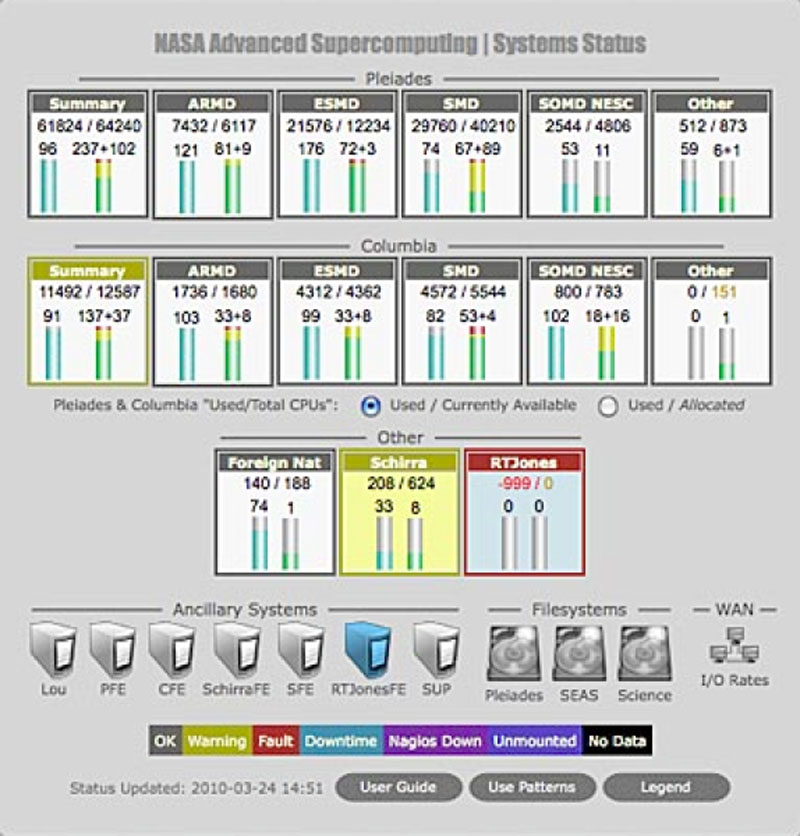
- At-a-glance status assessment of resources supporting the main NAS computing systems (Pleiades, Columbia, etc.)
- A new section for front-end and other ancillary systems, which indicates the number of users, status of system(s), and any anomalous conditions, such as inaccessibility or an inordinately high number of processes, for the various nodes comprising the front-end system suites
- File system section that shows free space and status for all file systems attached to the Pleiades and Columbia computational domains
- Network link showing current speeds and utilization percentages for all NAS wide-area network connections
System state for NAS front-end servers, file systems, and the wide-area network can now be quickly determined via colored icons, while rollovers provide important details of these resources, including any warnings or critical conditions.
These updates to the front page of MiniHUD were designed specifically to allow users to quickly assess a larger set of the NAS support infrastructure and compute systems-enabling them to focus more on science and engineering work, and reducing call volume to the NAS Control Room.
For more information about this activity, please contact: Glenn Deardorff
