
Automated Flow Analysis Tool Enhances File Transfer Performance
The NAS Network team has implemented a flow analysis tool that automatically identifies issues to improve remote file transfer performance.
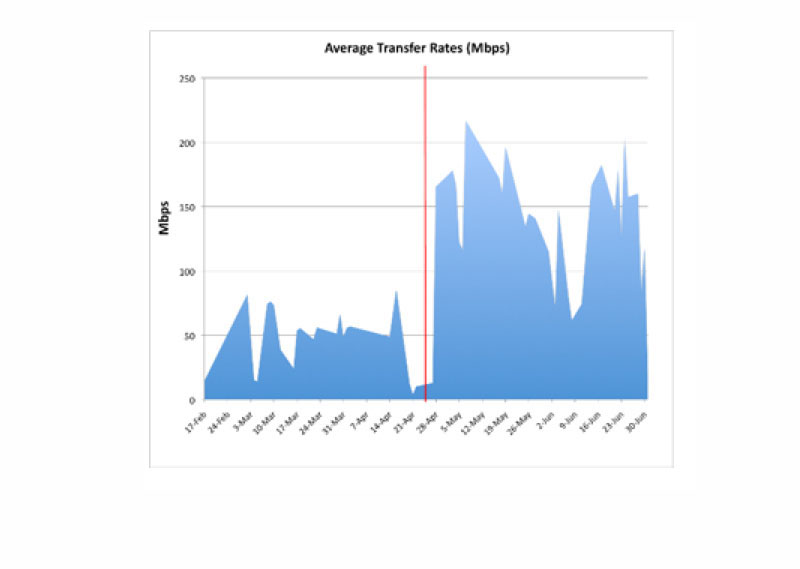
The tool has already proved highly successful for quickly identifying the source of problems, notifying NAS network engineers of slow flow throughput (measured in megabits per second, or Mbps), and enabling excellent speedup in file transfer rates for NASA scientists and engineers. For example, the new tool automatically notified network engineers of several performance issues for a user who was getting an average transfer rate of about 40 Mbps while transferring multiple gigabytes of data between NASA's Ames and Langley Research Centers. They immediately contacted the customer and, after looking at system settings, identified an issue with the local desktop connection at Langley, where their network staff resolved a port negotiation problem. As a result, the user was able to achieve performance rates averaging 140 Mbps and reaching up to 232 Mbps (see image).
The tool collects log information generated each time a customer connects to or from a NAS system using the bbFTP or secure copy (SCP) file transfer protocols. The data collected includes information about where the user is connecting from, the transfer rate, the size and location of the file, as well as the direction of the transfer. Each day, the tool automatically retrieves the log information from each system, then parses and inserts it into a back-end database, which stores all the relevant flow information and calculations used to determine flow throughput, file size, and other transfer time statistics. The tool then automatically queries this database for transfers that match a performance algorithm determined by the engineers and identifies cases that may be underperforming.
NAS network engineers can log into the tool via a web interface to test different algorithms, view transfer data, and log work done on each problem flow case. The interface provides instant access to detailed information about any given file transfer, transfer histories for each system or user, or records of similar transfers. With this information in hand, engineers can then contact users to help identify network and/or system issues that may be limiting throughput rates. The tool's front-end interface also keeps historical logs of all the team's work done on flow issues, which provides useful status updates and references for future issues.
